
Android App for Picking — Introduction
Voodoo Robotics CEO Trevor Blumenau introduces the Android app for picking with Big Block.
Watch on YouTubeInfo
We do not do this often enough, but we would like to update you on some of the recent updates you might have missed at Voodoo Robotics, starting with our most recent changes. Some of you may recognize changes resulting from your comments and requests.
In all that we do, we strive to maintain backward compatibility.
Device firmware version 67 has been released. It changes how much a single display can say at a glance.
The LED is no longer limited to the six standard colors. Firmware 67 supports thousands of colors, so every picker, order, zone or priority can have a shade of its own instead of sharing one of six.
When a command or static message carries only one line, firmware 67 fills the screen with it. Icons, arrows, quantities and text are drawn very large, so they can be read from much farther down the aisle. Send one line when distance matters; send several when the picker needs the detail.
Arrows are now drawn in the corner of the display that matches their direction. An arrow pointing down and to the right sits in the bottom-right corner, next to the location it refers to, so the picker's eye lands on the right bin before reading anything. Arrows work well with Location Aliases, which add them to your commands automatically.
Info
Firmware 67 can be installed over-the-air. Please contact us if you'd like to schedule an update for your devices.
The radio inside the Turbo has a new firmware release: RV. It is better able to handle untuned situations where a single Turbo is in range of 350 or more devices. Under that kind of load, the previous radio firmware could let command latency stretch to 30 seconds or more. With the RV radio firmware, latency stays reasonable even when the Turbo is crowded.
No hardware swap and no shipping: we can push the RV radio firmware to your Turbos remotely. Contact us to schedule an update.
Tip
Planning a new installation? We still size systems at about one Turbo per 100 devices, with every device in range of at least two Turbos. The 350-device figure is our specified maximum, not a design target. A Turbo may occasionally see that many devices, for example in facilities with mobile racking, but you should not lay out Turbos to reach that density on purpose.
We are excited to announce the launch of our completely redesigned website at voodoorobotics.com! The new site features a modern design, improved navigation, and better organization of our product information and resources.
Additionally, we've launched this dedicated developer documentation site at developer.voodoorobotics.com to provide comprehensive technical documentation, API references, integration guides, and best practices all in one place. Whether you're just getting started or building advanced integrations, you'll find everything you need to successfully implement Voodoo Robotics solutions.
Big Block API documentation has improved dramatically. We now support the OpenAPI specification (3.0.0) for the Device API, Location Alias API, Orders API, and Sequence API.
New Orders support in Big Block accepts structured work through the Orders API. Pickers can then use Voodoo's prebuilt Android app on a handheld scanner instead of requiring a custom picking GUI. The introduction and detailed walkthrough below show the app in action.
Voodoo Robotics CEO Trevor Blumenau introduces the Android app for picking with Big Block.
Watch on YouTubeSee more of the Android picking app's features and prebuilt operator interface.
Watch on YouTubeLocation Aliases are very useful if you a) want to refer to devices by location name instead of deviceid, or b) you want automatic arrows added to your commands or static updates. Check out the new documentation: Location Alias API
We have eliminated the requirement for communication over port 1883 for our Turbos. Now, with Turbo firmware version 9.1 and higher, all database updates are carried over the standard https port 443 channel. Existing customers can update to the new firmware but continue to use port 1883 if they'd like. It's one less barrier to an easy out-of-the-box setup experience!
Support for API Key authentication added. You can now simplify your authentication code by using an API Key. See the Authentication documentation.
Warning
Make sure you protect your API Keys just like you'd protect your password. You can also use an API Key for callback authentication.
We just released an open source web browser extension that allows you to light up the device for an item in an order, or even the whole order, right from your ShipStation interface. Check out the details at: ShipStation integration details
We just released an open source 'addon' for Odoo, a very widely used ERP system. Check out the integration details at: Odoo integration details
This integration and its source code are a great template for how to build code for other ERP, WMS or IMS systems going forward.
For those applications where pickers are in very close proximity to buttons and bumping into them on occasion, we now offer lower profile buttons that don't project out as far. If you need this style button, please contact us. They're easy to swap out.
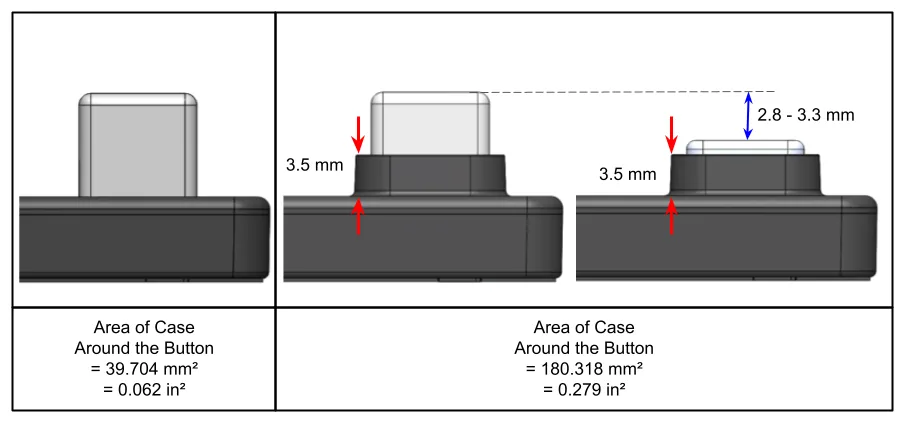
Button profile comparison: Low-profile (left) vs Standard (right)
For new orders, let us know at the time of ordering which style of button you prefer. We ship either.
As we announced at ProMat, our new devices have arrived. As you can see below the new devices:
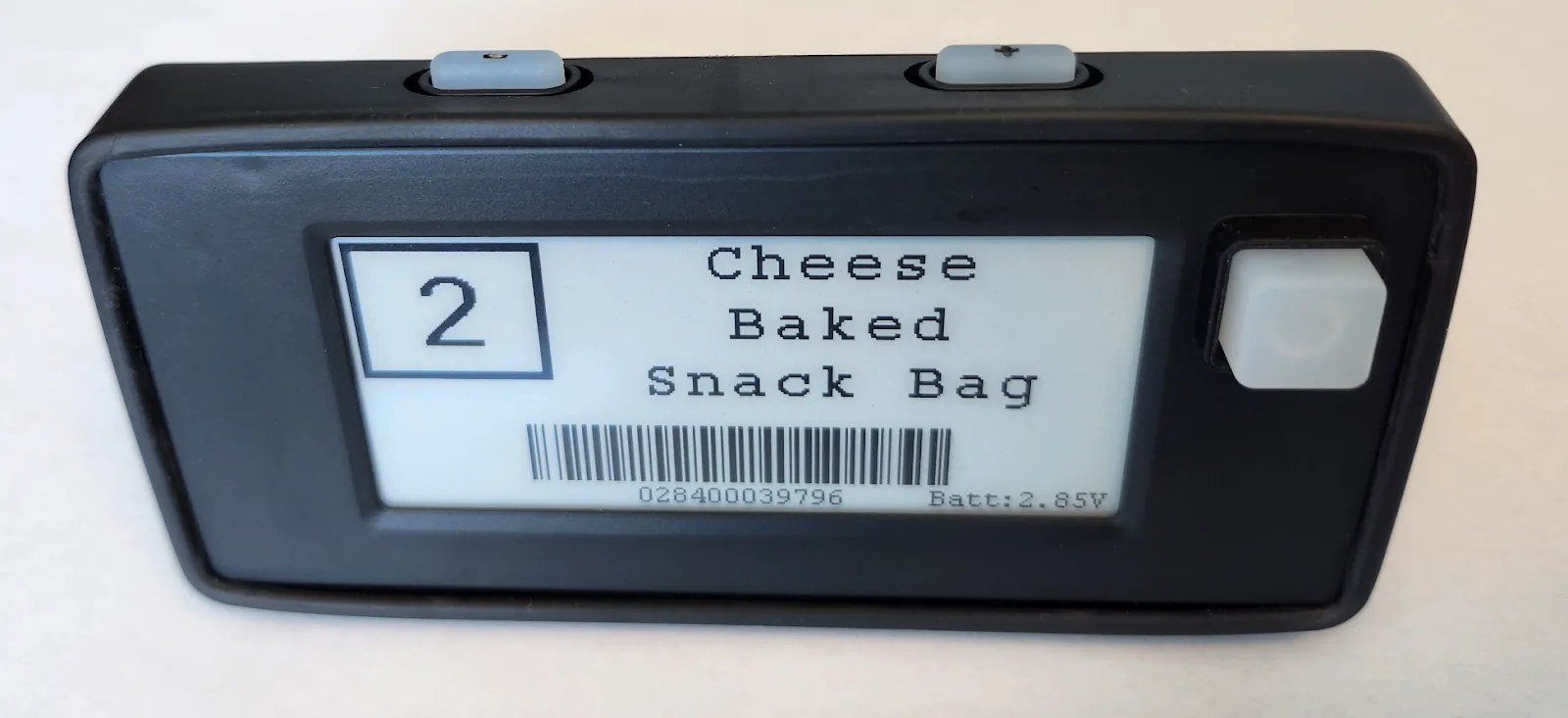
Multi-button device front view
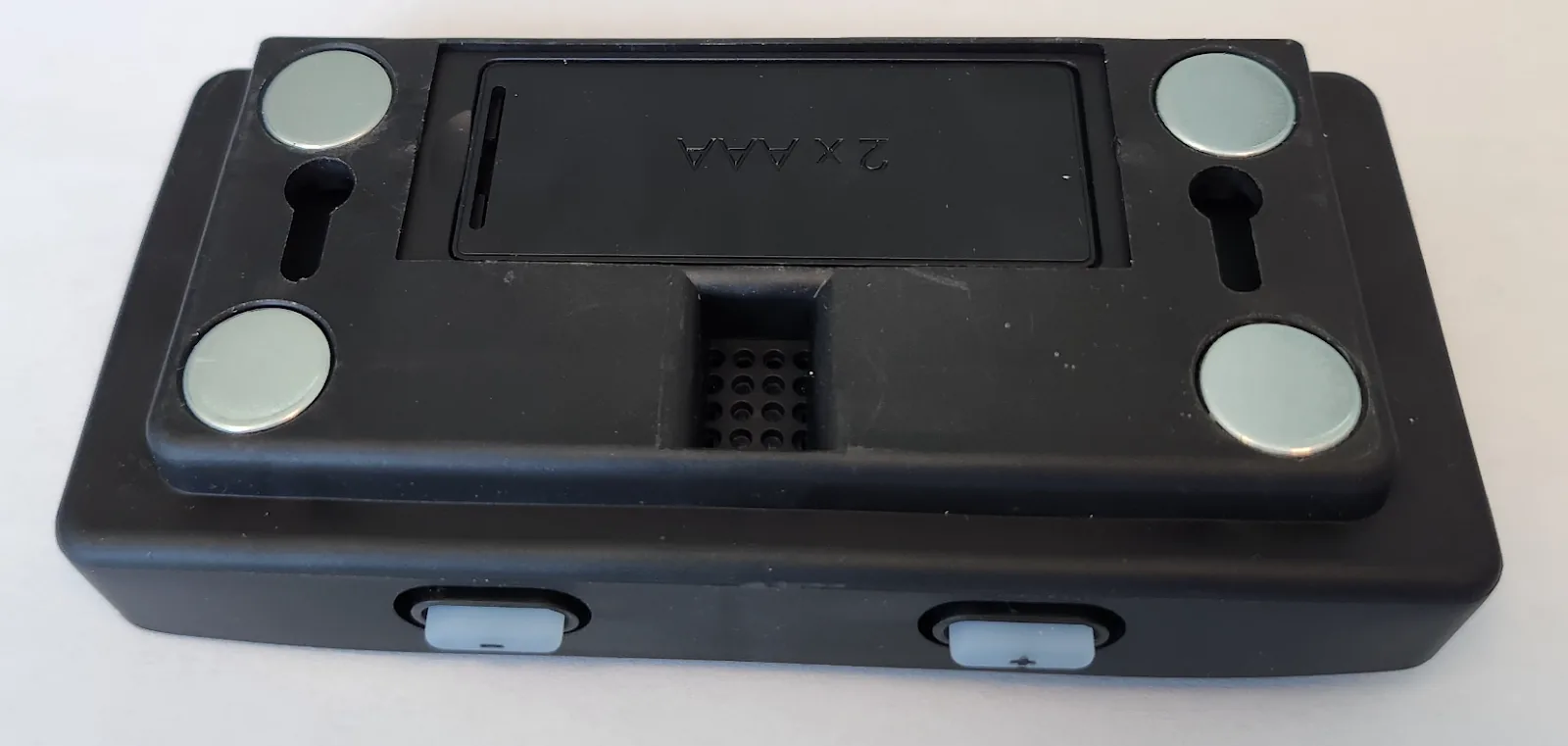
Multi-button device reverse view
Customers often asked us, "What should a picker do if a command instructs him to take 5 items when only 3 are available?" Well, now we have an answer! With this new device, the picker can adjust the quantity box before acknowledging the pick. The updated quantity is sent to the CONFIRMATION URL as described in the Big Block Settings page. (Some scrupulous programmers have been wondering why that mysterious quantity field was available in the feedback path. Well, now the reason is clear.)
But that's not the whole story of this new device. The (+) and (-) buttons can also be used to make unsolicited calls. See the description of unsolicited calls below. With this device there are five types of feedback calls: 'ack', 'nack', 'call', 'call_up', and 'call_down'.
Tip
Don't underestimate the utility of this feature! For example, one could very easily tie the (+) and (-) buttons directly to an Inventory Management System. Imagine walking around your racks and simply adjusting inventory directly, into your database, right from the device. Goodbye cycle counts!
Note also that these multi-button devices are an additional product for our lineup. The single button device will still be sold. Some customers will need single button devices, while other customers need multi-buttons.
You can now use shortcuts in your REST API calls. Instead of 'line1':'\ictop' or 'statica':'\ictop' as described in Line Encodings, you can now use the more intuitive 'arrow':'top'. Similarly you can do 'barcode':'12345' or 'qrcode':'12345' or 'quantity':20 or 'icon':'Z'.
You can now automagically update statics on any device upon an 'ack' to any command. Simply embed ackstaticupdate[FFEEFF:CCDDCC]="first|second|third|fourth|lines" in your nonce, and Big Block will update the statics on that device. Embed as many updates as you need. This works in commands or in Sequences, both at the Step nonce level and at the Sequence nonce level.
Overnight voltage alert e-mails are now more detailed with direct links to the server. They now include below voltage devices, non-reporting devices, and overlapping location reports.
Log file searches are WAY faster.
Requests to the device endpoint can include a location/area substring instead of a DeviceID. A list of devices with location/area that match the substring will be returned. This is useful when you're looking for all devices in a particular area, for example.
Are you running the new RU radios?! You won't believe the incredible new speed of the latest Turbo. Here's a video of our CEO, Trevor Blumenau, demonstrating the improvements:
Contact us to upgrade your Turbos to the new Turbo II standard.
New device cases have arrived! The new cases have the following:
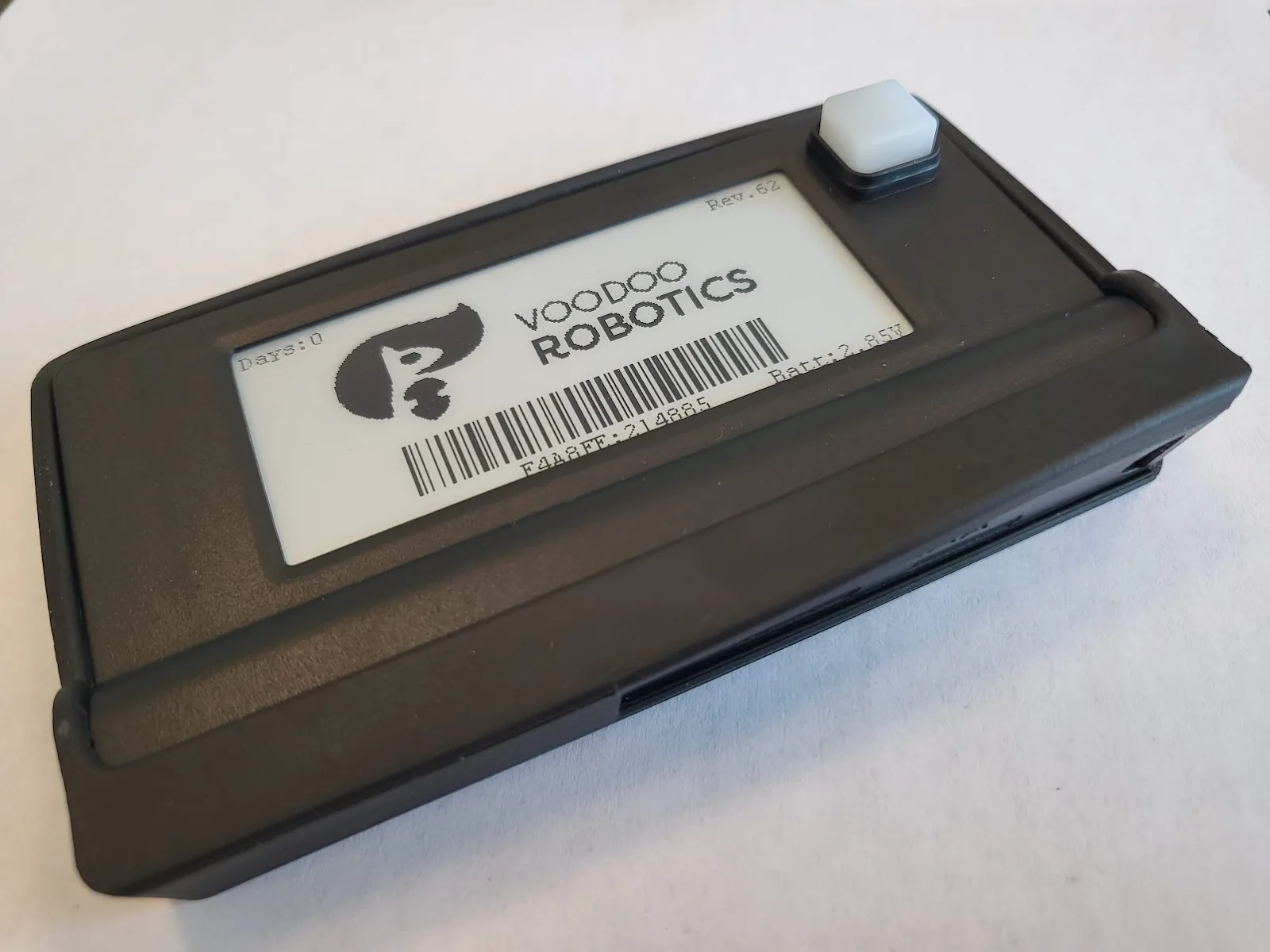
Device case design
Yes, you can upgrade your current devices with the new cases! Check with us for our latest deal on an upgrade.
We have placed each REST API tutorial beside the documentation it demonstrates, so you can watch the walkthrough and then continue with the current examples.
These are great tutorials on using Python in Visual Studio Code and watching them in detail is definitely worth an integrator's time.
We have added a Best Practices page with over 20 tips and tricks that will help you create and improve your integration.
We have added support for unsolicited calls. You might ask what on earth is an unsolicited call? Until device firmware 60, devices could only send back a message to the callback URL as an ack or nack from an issued command. But now you can actually go up to a device and push the button while it is displaying its static messages between commands. A long button press sends a lower-case call to the callback URL. On multi-button devices, the plus and minus buttons send lower-case call_up and call_down when the device is idle. When your callback URL receiver gets one of these messages it can take any action you define. Perhaps you would like to acknowledge the button press with some command to the device, or maybe launch a sequence, or adjust inventory counts…. The options are endless!
If plus or minus is pressed during an active command, that is not an unsolicited callback. In that case the device tries to adjust the quantity parameter for the command instead. You can also statically set unsolicitedNonce on the device; that value is then returned in the callback nonce field for unsolicited button presses.
Customers can now set their own callback URL and parameters (including security settings) on the Settings page of www.voodoodevices.com or their self-hosted Big Block.
Info
If you would like to update your device firmware let us know and we can do that "over-the-air" at your convenience.
We added support for OAUTH2. Until server version 1.7 we supported logins using session-based authentication with a SESSID cookie and a CSRF-Token. Now we've added the ability to connect to our server using OAUTH2. This facilitates the use of more standard libraries and tools for your integration.
More information about OAUTH2 and our support for the protocol is available in our Authentication documentation.
We have replaced www.sku-keeper.com with an entirely new server at www.voodoodevices.com. This is a very broad update of features for customers using our multi-tenant server option. Essentially, customers get almost all the features of the Big Block server with this upgrade including Voltage graphs, transaction tracking, user management, etc. We urge you to login and try the new server out. You'll love what you see. (Your SKU-keeper credentials should work.)
We have added Sequences. A sequence is a series of steps or commands that you can upload to the Big Block server and execute to perform the steps in series. For example, you can have three commands that lead to two more commands as soon as they are completed, followed by four other commands. This is a very flexible and speedy way for you to let Big Block take care of the real-time responses to command acknowledgements.
You can upload and/or launch sequences through the REST API.
Our Turbos have a whole new look and feel. They now support Power over Ethernet and have an integrated touchscreen:
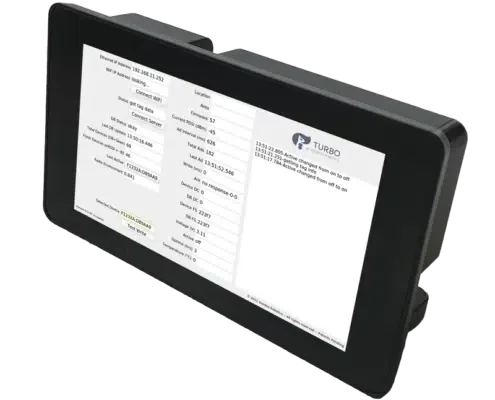
Turbo POE-T angle view
The idle screen now adds descriptive text to explain the status numbers. We can push the new Graphical User Interface (GUI) to your Turbo if you would like (to both Classic Turbos and the new Turbo POE-T). Just let us know what time is good for you. You may also convert your existing Classic Turbos to POE using a Power over Ethernet (POE) Splitter Adapter.
Check out all the new features of our Big Block server, now available for local installations. Voodoo CEO, Trevor Blumenau, gives a detailed description on YouTube:
Devices now support overlapping commands. You no longer need to worry about sending more than one command to a device at a time. Devices will handle this automatically by flipping back and forth between up to 12 commands at one time. This is a very important feature for multiple pickers picking from the same inventory in the same area.